InfDB Tool Template
A reusable template for creating Docker-based development containers that interact with the InfDB infrastructure. This template provides a standardized structure for importing (eg. infdb-laoder) data, processing tools (eg infdb-basedata), and analysis scripts (kwp) that work with the InfDB PostgreSQL/PostGIS database.
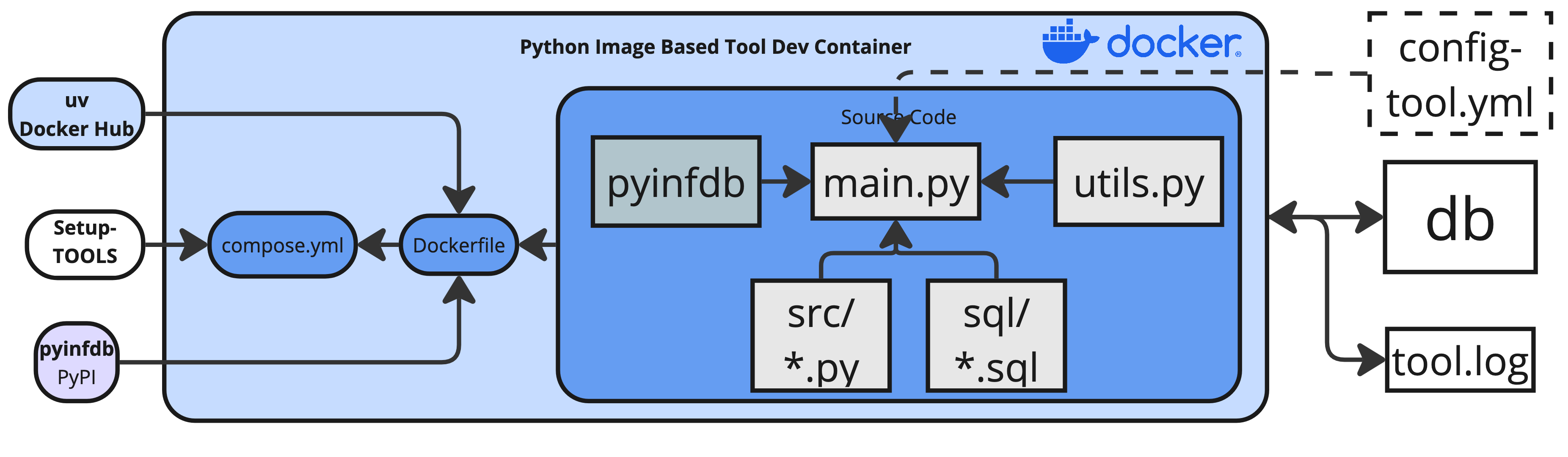
This template enables you to:
- Quickly scaffold new InfDB tools with consistent structure
- Access InfDB database connections with pre-configured clients
- Run Python scripts with geospatial capabilities (GeoPandas, SQLAlchemy)
- Execute SQL scripts for database operations
- Develop with VS Code dev containers for debugging
Getting Started
Prerequisites:
- Docker Desktop (or Docker Engine) installed
- Follow development workflow instructions below
- Run commands from the repository root
Option A — Docker Compose: Start tool
Option B — VS Code Dev Containers:
- Open created tool folder in Visual Studio Code: File → → Open Folder... →
tools/choose-a-name - Install the “Dev Containers” extension
- Press F1 → “Dev Containers: Reopen in Container”
- Run and debug (F5) with breakpoints in Python
Hint: If there is an error on startup while building since dev container already exists by using Option A, then delete it before manually: